
Loading your selected session…
Your selected session
IWCF - Drilling Well Control L3/4 (ONLINE)
- Date
- Monday 11 January 2027
- Time
- 10:00 am – 06:00 pm
- Location
- AWCC Online
- Standard fee
- AUD $2,475.00
The standard session fee is shown above and includes GST. Have your IWCF candidate number ready, because you cannot sit the assessment without one.
Your selected session
IWCF - Drilling Well Control L3/4 (ONLINE)
- Date
- Monday 25 January 2027
- Time
- 10:00 am – 06:00 pm
- Location
- AWCC Online
- Standard fee
- AUD $2,475.00
The standard session fee is shown above and includes GST. Have your IWCF candidate number ready, because you cannot sit the assessment without one.
Your selected session
IWCF - Drilling Well Control L3/4 (ONLINE)
- Date
- Monday 22 February 2027
- Time
- 10:00 am – 06:00 pm
- Location
- AWCC Online
- Standard fee
- AUD $2,475.00
The standard session fee is shown above and includes GST. Have your IWCF candidate number ready, because you cannot sit the assessment without one.
Your selected session
IWCF - Drilling Well Control L3/4 (ONLINE)
- Date
- Monday 8 March 2027
- Time
- 10:00 am – 06:00 pm
- Location
- AWCC Online
- Standard fee
- AUD $2,475.00
The standard session fee is shown above and includes GST. Have your IWCF candidate number ready, because you cannot sit the assessment without one.
Your selected session
IWCF - Drilling Well Control L3/4 (ONLINE)
- Date
- Monday 5 April 2027
- Time
- 10:00 am – 06:00 pm
- Location
- AWCC Online
- Standard fee
- AUD $2,475.00
The standard session fee is shown above and includes GST. Have your IWCF candidate number ready, because you cannot sit the assessment without one.
Your selected session
IWCF - Drilling Well Control L3/4 (ONLINE)
- Date
- Monday 12 April 2027
- Time
- 10:00 am – 06:00 pm
- Location
- AWCC Online
- Standard fee
- AUD $2,475.00
The standard session fee is shown above and includes GST. Have your IWCF candidate number ready, because you cannot sit the assessment without one.
Your selected session
IWCF - Drilling Well Control L3/4 (ONLINE)
- Date
- Monday 3 May 2027
- Time
- 10:00 am – 06:00 pm
- Location
- AWCC Online
- Standard fee
- AUD $2,475.00
The standard session fee is shown above and includes GST. Have your IWCF candidate number ready, because you cannot sit the assessment without one.
Your selected session
IWCF - Drilling Well Control L3/4 (ONLINE)
- Date
- Monday 7 June 2027
- Time
- 10:00 am – 06:00 pm
- Location
- AWCC Online
- Standard fee
- AUD $2,475.00
The standard session fee is shown above and includes GST. Have your IWCF candidate number ready, because you cannot sit the assessment without one.
Your selected session
IWCF - Drilling Well Control L3/4 (ONLINE)
- Date
- Monday 28 June 2027
- Time
- 10:00 am – 06:00 pm
- Location
- AWCC Online
- Standard fee
- AUD $2,475.00
The standard session fee is shown above and includes GST. Have your IWCF candidate number ready, because you cannot sit the assessment without one.
Your selected session
IWCF - Level 3 and 4
- Date
- Monday 23 November 2026
- Time
- 07:30 am – 04:30 pm
- Location
- AWCC Toowoomba
- Standard fee
- AUD $3,245.00
The standard session fee is shown above and includes GST. Have your IWCF candidate number ready, because you cannot sit the assessment without one.
Your selected session
IWCF - Level 3 and 4
- Date
- Monday 30 November 2026
- Time
- 07:30 am – 04:00 pm
- Location
- AWCC Brisbane
- Standard fee
- AUD $3,245.00
The standard session fee is shown above and includes GST. Have your IWCF candidate number ready, because you cannot sit the assessment without one.
Your selected session
IWCF - Level 3 and 4
- Date
- Monday 30 November 2026
- Time
- 07:30 am – 04:30 pm
- Location
- AWCC Toowoomba
- Standard fee
- AUD $3,245.00
The standard session fee is shown above and includes GST. Have your IWCF candidate number ready, because you cannot sit the assessment without one.
Your selected session
IWCF - Level 3 and 4
- Date
- Monday 7 December 2026
- Time
- 07:30 am – 04:00 pm
- Location
- AWCC Toowoomba
- Standard fee
- AUD $3,245.00
The standard session fee is shown above and includes GST. Have your IWCF candidate number ready, because you cannot sit the assessment without one.
Your selected session
IWCF - Level 3 and 4
- Date
- Monday 14 December 2026
- Time
- 07:30 am – 04:00 pm
- Location
- AWCC Brisbane
- Standard fee
- AUD $3,245.00
The standard session fee is shown above and includes GST. Have your IWCF candidate number ready, because you cannot sit the assessment without one.
Your selected session
IWCF - Level 3 and 4
- Date
- Monday 14 December 2026
- Time
- 07:30 am – 04:00 pm
- Location
- AWCC Toowoomba
- Standard fee
- AUD $3,245.00
The standard session fee is shown above and includes GST. Have your IWCF candidate number ready, because you cannot sit the assessment without one.
Your selected session
IWCF - Level 3 and 4
- Date
- Monday 4 January 2027
- Time
- 07:30 am – 04:00 pm
- Location
- AWCC Toowoomba
- Standard fee
- AUD $3,245.00
The standard session fee is shown above and includes GST. Have your IWCF candidate number ready, because you cannot sit the assessment without one.
Your selected session
IWCF - Level 3 and 4
- Date
- Monday 11 January 2027
- Time
- 07:30 am – 04:00 pm
- Location
- AWCC Toowoomba
- Standard fee
- AUD $3,245.00
The standard session fee is shown above and includes GST. Have your IWCF candidate number ready, because you cannot sit the assessment without one.
Your selected session
IWCF - Level 3 and 4
- Date
- Monday 18 January 2027
- Time
- 07:30 am – 04:00 pm
- Location
- AWCC Brisbane
- Standard fee
- AUD $3,245.00
The standard session fee is shown above and includes GST. Have your IWCF candidate number ready, because you cannot sit the assessment without one.
Your selected session
IWCF - Level 3 and 4
- Date
- Monday 1 February 2027
- Time
- 07:30 am – 04:00 pm
- Location
- AWCC Brisbane
- Standard fee
- AUD $3,245.00
The standard session fee is shown above and includes GST. Have your IWCF candidate number ready, because you cannot sit the assessment without one.
Your selected session
IWCF - Level 3 and 4
- Date
- Monday 1 February 2027
- Time
- 07:30 am – 04:00 pm
- Location
- AWCC Toowoomba
- Standard fee
- AUD $3,245.00
The standard session fee is shown above and includes GST. Have your IWCF candidate number ready, because you cannot sit the assessment without one.
Your selected session
IWCF - Level 3 and 4
- Date
- Monday 8 February 2027
- Time
- 07:00 am – 04:00 pm
- Location
- AWCC Brisbane
- Standard fee
- AUD $3,245.00
The standard session fee is shown above and includes GST. Have your IWCF candidate number ready, because you cannot sit the assessment without one.
Your selected session
IWCF - Level 3 and 4
- Date
- Monday 8 February 2027
- Time
- 07:30 am – 04:00 pm
- Location
- AWCC Toowoomba
- Standard fee
- AUD $3,245.00
The standard session fee is shown above and includes GST. Have your IWCF candidate number ready, because you cannot sit the assessment without one.
Your selected session
IWCF - Level 3 and 4
- Date
- Monday 15 February 2027
- Time
- 07:30 am – 04:00 pm
- Location
- AWCC Toowoomba
- Standard fee
- AUD $3,245.00
The standard session fee is shown above and includes GST. Have your IWCF candidate number ready, because you cannot sit the assessment without one.
Your selected session
IWCF - Level 3 and 4
- Date
- Monday 22 February 2027
- Time
- 07:30 am – 04:00 pm
- Location
- AWCC Toowoomba
- Standard fee
- AUD $3,245.00
The standard session fee is shown above and includes GST. Have your IWCF candidate number ready, because you cannot sit the assessment without one.
Your selected session
IWCF - Level 3 and 4
- Date
- Monday 8 March 2027
- Time
- 07:30 am – 04:00 pm
- Location
- AWCC Toowoomba
- Standard fee
- AUD $3,245.00
The standard session fee is shown above and includes GST. Have your IWCF candidate number ready, because you cannot sit the assessment without one.
Your selected session
IWCF - Level 3 and 4
- Date
- Monday 15 March 2027
- Time
- 07:30 am – 04:00 pm
- Location
- AWCC Toowoomba
- Standard fee
- AUD $3,245.00
The standard session fee is shown above and includes GST. Have your IWCF candidate number ready, because you cannot sit the assessment without one.
Your selected session
IWCF - Level 3 and 4
- Date
- Sunday 21 March 2027
- Time
- 07:30 am – 04:00 pm
- Location
- AWCC Toowoomba
- Standard fee
- AUD $3,245.00
The standard session fee is shown above and includes GST. Have your IWCF candidate number ready, because you cannot sit the assessment without one.
Your selected session
IWCF - Level 3 and 4
- Date
- Monday 5 April 2027
- Time
- 07:30 am – 04:00 pm
- Location
- AWCC Toowoomba
- Standard fee
- AUD $3,245.00
The standard session fee is shown above and includes GST. Have your IWCF candidate number ready, because you cannot sit the assessment without one.
Your selected session
IWCF - Level 3 and 4
- Date
- Monday 12 April 2027
- Time
- 07:30 am – 04:00 pm
- Location
- AWCC Toowoomba
- Standard fee
- AUD $3,245.00
The standard session fee is shown above and includes GST. Have your IWCF candidate number ready, because you cannot sit the assessment without one.
Your selected session
IWCF - Level 3 and 4
- Date
- Monday 19 April 2027
- Time
- 07:30 am – 04:00 pm
- Location
- AWCC Toowoomba
- Standard fee
- AUD $3,245.00
The standard session fee is shown above and includes GST. Have your IWCF candidate number ready, because you cannot sit the assessment without one.
Your selected session
IWCF - Level 3 and 4
- Date
- Monday 3 May 2027
- Time
- 07:30 am – 04:00 pm
- Location
- AWCC Toowoomba
- Standard fee
- AUD $3,245.00
The standard session fee is shown above and includes GST. Have your IWCF candidate number ready, because you cannot sit the assessment without one.
Your selected session
IWCF - Level 3 and 4
- Date
- Monday 10 May 2027
- Time
- 07:30 am – 04:00 pm
- Location
- AWCC Brisbane
- Standard fee
- AUD $3,245.00
The standard session fee is shown above and includes GST. Have your IWCF candidate number ready, because you cannot sit the assessment without one.
Your selected session
IWCF - Level 3 and 4
- Date
- Monday 17 May 2027
- Time
- 07:30 am – 04:00 pm
- Location
- AWCC Toowoomba
- Standard fee
- AUD $3,245.00
The standard session fee is shown above and includes GST. Have your IWCF candidate number ready, because you cannot sit the assessment without one.
Your selected session
IWCF - Level 3 and 4
- Date
- Monday 31 May 2027
- Time
- 07:30 am – 04:00 pm
- Location
- AWCC Toowoomba
- Standard fee
- AUD $3,245.00
The standard session fee is shown above and includes GST. Have your IWCF candidate number ready, because you cannot sit the assessment without one.
Your selected session
IWCF - Level 3 and 4
- Date
- Monday 7 June 2027
- Time
- 07:30 am – 04:00 pm
- Location
- AWCC Brisbane
- Standard fee
- AUD $3,245.00
The standard session fee is shown above and includes GST. Have your IWCF candidate number ready, because you cannot sit the assessment without one.
Your selected session
IWCF - Level 3 and 4
- Date
- Monday 14 June 2027
- Time
- 07:30 am – 04:00 pm
- Location
- AWCC Toowoomba
- Standard fee
- AUD $3,245.00
The standard session fee is shown above and includes GST. Have your IWCF candidate number ready, because you cannot sit the assessment without one.
Your selected session
IWCF - Level 3 and 4
- Date
- Monday 14 June 2027
- Time
- 07:30 am – 04:00 pm
- Location
- AWCC Brisbane
- Standard fee
- AUD $3,245.00
The standard session fee is shown above and includes GST. Have your IWCF candidate number ready, because you cannot sit the assessment without one.
Your selected session
IWCF - Level 3 and 4
- Date
- Monday 28 June 2027
- Time
- 07:30 am – 04:00 pm
- Location
- AWCC Toowoomba
- Standard fee
- AUD $3,245.00
The standard session fee is shown above and includes GST. Have your IWCF candidate number ready, because you cannot sit the assessment without one.
Before you enrol
Have your photo ID ready before you start. Photo ID upload is part of the online enrolment process, before you review your details and proceed to payment.
- Your details: have your contact details and an email address you can access ready.
- Your photo ID: save a clear digital copy on the phone, tablet or computer you will use to enrol.
- Your payment choice: pay online by card, or choose Send Invoice during billing.
Accepted photo ID
AWCC accepts the following three types of photo ID. Have a copy of one of these ready to upload.
Passport
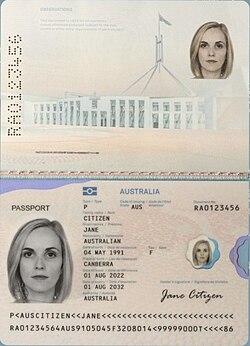
Use the photo and personal-details page.
Driver licence
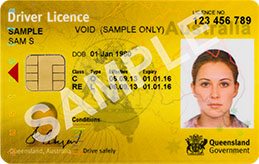
Make sure the photograph and identification details are clearly visible.
Proof-of-age card
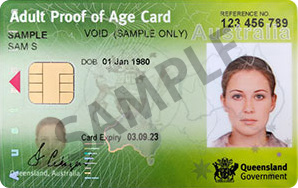
Make sure the photograph and identification details are clearly visible.
These images are examples only. For a real enrolment, upload your own ID, not a sample image.
Prepare a readable copy
- Make sure the photograph, name and identification details are sharp and readable.
- Show the whole card or passport photo page, with all edges visible.
- Avoid glare, shadows, blur or covering any details.
- Upload the file through the enrolment form’s Photo ID step.
- If you have trouble uploading, you can continue with your booking. Bring your accepted photo ID on the day. For an online course, contact AWCC before your session to arrange the ID check.
What happens during enrolment?
- Check the selected session shown above.
- Enter your name and email, then complete the learner information.
- Upload your photo ID in the Photo ID step.
- Review your details, then choose card payment or Send Invoice during billing.
Need help before you begin? Call AWCC on (07) 4638 0532.